
ArgoCD
Monitoring of ArgoCD applications and sync history in Pipedash, with Git organization filters and sync triggers.
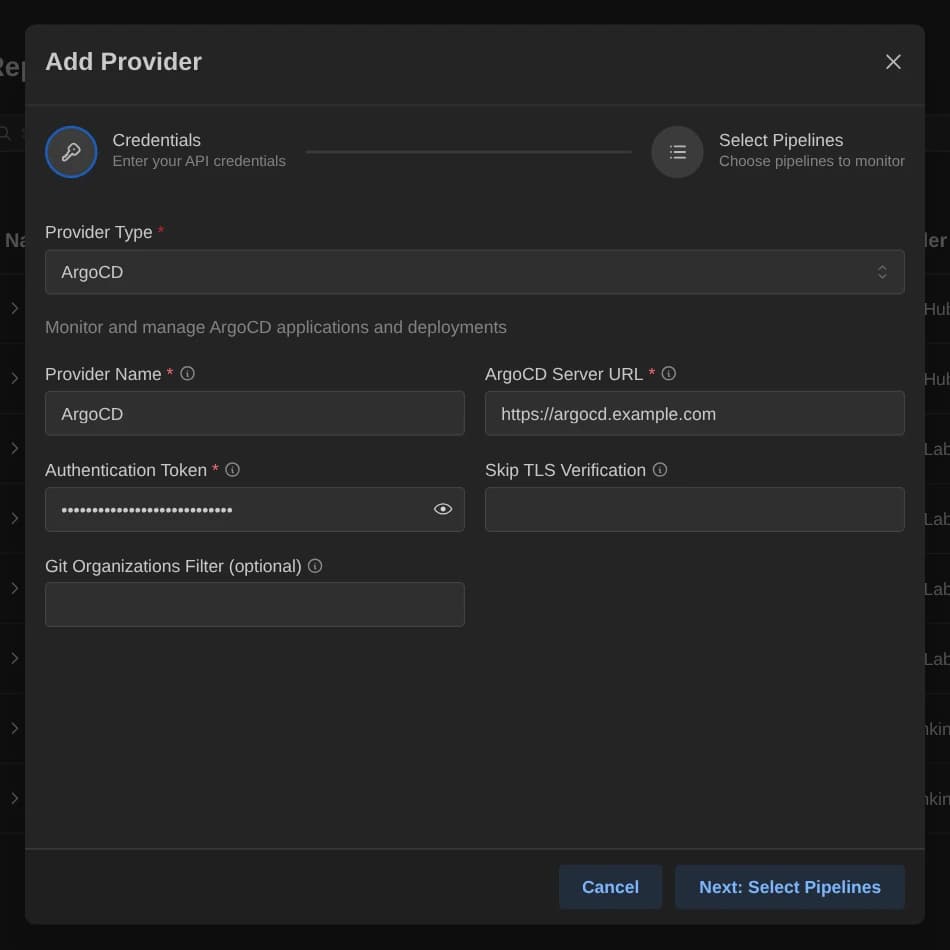
The ArgoCD plugin (argocd) treats each ArgoCD application as a pipeline. It shows sync and health state, lists deployment history as runs, starts syncs and stops running operations.
Requirements
The plugin authenticates with an ArgoCD authentication token or a Kubernetes service account token, which Pipedash sends as a bearer token. ArgoCD has no optional scopes. The token needs permission to read applications, because validation lists them.
Configuration
| Key | Type | Required | Default | Description |
|---|---|---|---|---|
server_url | Text | Yes | None | ArgoCD API server URL, for example https://argocd.example.com. Must start with http:// or https://. |
token | Password | Yes | None | ArgoCD authentication token or Kubernetes service account token. |
insecure | Boolean | No | false | Skips TLS certificate verification, for self-signed certificates. |
organizations | MultiSelect | No | None | Git organizations that filter the applications. Empty shows all. In the file, the value is a comma-separated string. |
The choices for organizations are the Git organizations of the source repositories of the applications. The config table of the TOML file also takes selected_items, a comma-separated list of application names.
Base URL
ArgoCD has no default host, so server_url is required. A trailing slash is ignored. insecure = true suits a server with a self-signed certificate.
Pipeline discovery
Pipedash lists all applications from the server, keeps those whose source repository belongs to a listed Git organization, then keeps those named in selected_items. Without a filter, all applications stay. The Git organization is the segment before the repository name in the source URL, for both HTTPS and SSH URLs, so [email protected]:acme/app.git gives acme. Search matches application name and repository URL.
Run history comes from the application's deployment history, newest first. Pipedash adds the current operation as the first run when the application has one.
Trigger parameters
Triggering a pipeline starts a sync of the application. None of the options is required.
| Name | Type | Required | Default | Description |
|---|---|---|---|---|
revision | String | No | None | Git revision (branch, tag or commit SHA) to sync to. Empty uses the target revision. |
prune | Boolean | No | false | Deletes resources that are no longer defined in Git. |
dry_run | Boolean | No | false | Previews the sync without applying changes. |
force | Boolean | No | false | Forces the sync even if resources are already synced. |
apply_only | Boolean | No | false | Skips pre-sync and post-sync hooks. |
Cancel
Cancel stops the running operation of the application. The run number is ignored, because an application has one operation at a time.
TOML example
[providers.argocd-prod]
name = "ArgoCD Prod"
type = "argocd"
token = "${ARGOCD_TOKEN}"
refresh_interval = 30

[providers.argocd-prod.config]
server_url = "https://argocd.example.com"
insecure = "false"
organizations = "acme,platform"
selected_items = "payments,checkout"
Status mapping
The application list uses the operation phase first, then the health status, then the sync status.
| Pipedash status | ArgoCD state |
|---|---|
success | Health Healthy and sync status Synced |
failed | Operation phase Failed or Error, or health Degraded or Missing |
running | Operation phase Running or Terminating, or health Progressing |
pending | Health Healthy with any other sync status, and any other health value |
cancelled | Health Suspended |
skipped | Not produced by this plugin |
Runs follow a separate rule. The current operation maps Running and Terminating to running, Succeeded to success, Failed and Error to failed, and any other phase to pending. Entries from the deployment history always map to success.