
Trigger and cancel
Workflow triggers from a parameter form, cancellation of a running run and the permissions each action needs.
Pipedash starts and stops runs through the provider's API. The trigger form loads the workflow's parameters first, and the cancel action targets one run.
Workflow triggers
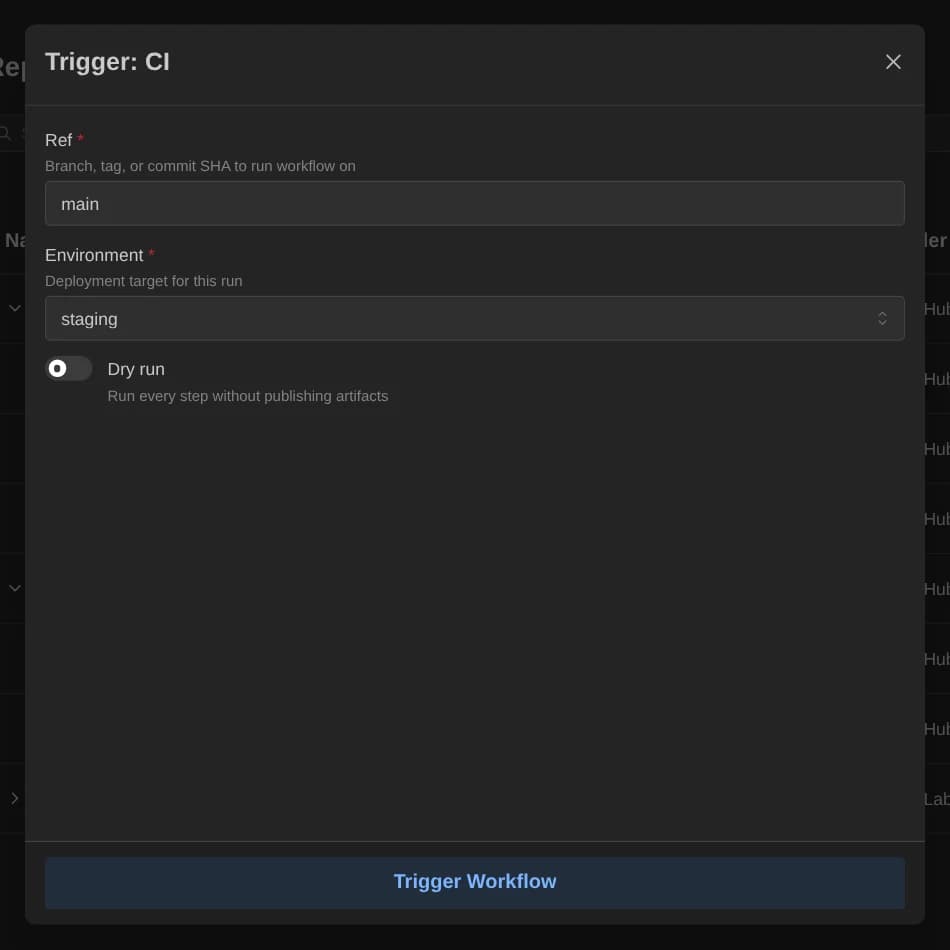
The play icon on a workflow row, on the dashboard or on mobile, opens the dialog titled Trigger: <workflow name>. Rerun opens the same dialog titled Rerun: <workflow name> with the inputs filled in. The Run history page covers rerun.
- Pipedash loads the workflow parameters from the provider. The REST route is
GET /api/v1/pipelines/{id}/workflow-params. - The dialog shows one control per parameter.
- The Trigger Workflow button sends the request. It stays disabled while parameters load, while a request runs and after a load error. REST uses
POST /api/v1/pipelines/{id}/trigger.
Parameter types
Each parameter has a name, label, description, default value and a required flag. There are four types.
| Type | Control | Behavior |
|---|---|---|
string | Text input | Also the fallback for any unknown type. A blank default is ignored. |
boolean | Switch | Starts at false when there is no default. |
choice | Select | Duplicate options are removed. The select is clearable unless the parameter is required. |
number | Number input | Placeholder Enter a number. |
A rerun fills each control from the saved inputs first and falls back to the default.
Required parameters
Before sending, Pipedash checks every required parameter. A missing value or a blank string blocks the request and shows the error Parameter "<label>" is required. A boolean false counts as a value. When no control has a value, the request sends no inputs at all.
Result
When the provider reports the new run number, the dialog closes, the lists refresh and the Run Details dialog opens for the new run. Otherwise the dialog closes and a yellow note says the run number is not available yet.
GitHub looks for the new run up to 10 times before it falls back to the latest run it can find. Other providers have their own parameters, such as ref on GitHub, GitLab and Bitbucket and branch on Buildkite. The Providers page lists them.
Parameter cache
Pipedash caches parameters per workflow. Several actions clear them:
DELETE /api/v1/cache/workflow-paramson the REST API.- The Clear button for workflow parameters in Settings, described on the Cache page.
- Every pipeline fetch. The refresh loop fetches pipelines while the app is active, so the next dialog open after a cycle loads parameters from the provider again.
Run cancellation
Cancel works on runs with status running. REST uses POST /api/v1/pipelines/{id}/runs/{run_number}/cancel.
There are two entry points:
- Run table: the stop icon opens a confirmation, "Are you sure you want to cancel run #N?". The dialog offers Cancel Run to confirm and Keep Running to back out. A success toast reads "Run #N cancellation requested".
- Run Details dialog: Stop Workflow cancels at once. The dialog then checks the run every second, up to 10 times, until the status is
cancelled, and refreshes the lists.
Pipedash cannot cancel a pending run. The stop button stays disabled and its tooltip reads "Cannot cancel pending workflow".
All 7 providers support cancel. ArgoCD stops the running operation of the application and ignores the run number.
Permissions
Each provider feature needs certain token permissions. GitHub, for example, needs the workflow scope to trigger and cancel. Bitbucket needs write:pipeline:bitbucket for both. The Add Provider dialog checks the permissions of the token and reports which features are available. GET /api/v1/providers/{id}/features returns the same availability on the REST API.
The dashboard and run history do not hide the trigger and stop buttons when a scope is missing. The provider's error comes back as a "Failed to Trigger Workflow" or "Failed to Cancel Run" notification.
After the call
Once the provider accepts the request, an open run history updates on its own. A trigger returns it to page 1 and a cancel refetches the current page.