
Mobile
Pipedash on iOS from the App Store, what the mobile layout changes, token storage and Android status.
Pipedash for iOS is on the App Store. It is the same app as the desktop version, packaged with Tauri 2 mobile. Android has build tasks but no release.
iOS installation
The App Store listing carries the name "Pipedash CI/CD Monitoring". Adding a provider works the same way as on desktop.
What changes on a small screen
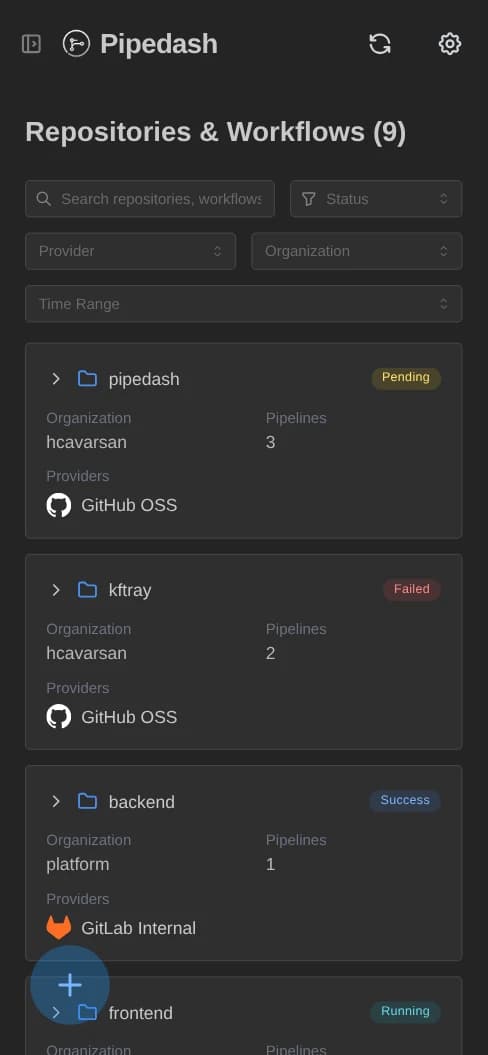
The layout switches at 768 px. It follows the window width and not the device type, so a narrow desktop window gets the same layout.
| Area | Mobile behavior |
|---|---|
| Modals | Open as a full-height drawer that slides up from the bottom. |
| Safe areas | Headers and drawer footers leave room for the notch and the home indicator. |
| Window controls | The custom window controls are hidden. |
| Add provider | A round button floats at the bottom left, above the home indicator. |
| Dashboard | Pipelines show as cards. Desktop shows a table. |
| Settings | The 5 sections become tabs. Desktop shows a sidebar. |
| Run history | More runs load on scroll, see below. |
Run history pagination
On mobile, the run history loads the next page when the end of the list is half visible and more runs exist. The list appends new runs and skips a run it already holds. A spinner shows while the next page loads.
Token storage
iOS uses the same token store as macOS, the Apple Keychain. See token storage for the other stores.
Android
Android is not released. The install:android, dev:android and build:android tasks exist for development, and they wrap bun run tauri android init, dev and build.
Build tasks for iOS
These mise tasks wrap the Tauri mobile CLI.
mise run install:ios
mise run dev:ios
mise run build:ios| Task | Command run | Use |
|---|---|---|
install:ios | bun run tauri ios init | Creates the iOS project. Needs one run. |
dev:ios | bun run tauri ios dev | Starts the app in development mode. |
build:ios | bun run tauri ios build | Builds the release app. |
See development for the rest of the toolchain.